echo "export IBUS_ENABLE_SYNC_MODE=1" >> ~/.bashrc
source ~/.bashrcFriday, August 26, 2016
IBus prior to 1.5.11 may cause input problems. See IDEA-78860 for details.


Monday, August 22, 2016
Previously prefixed properties now standard
List of deprecated css
Remove it all, they are unnecessary
-moz-animation [Prefixed version still accepted]
-moz-animation-delay [Prefixed version still accepted]
-moz-animation-direction [Prefixed version still accepted]
-moz-animation-duration [Prefixed version still accepted]
-moz-animation-fill-mode [Prefixed version still accepted]
-moz-animation-iteration-count [Prefixed version still accepted]
-moz-animation-name [Prefixed version still accepted]
-moz-animation-play-state [Prefixed version still accepted]
-moz-animation-timing-function [Prefixed version still accepted]
-moz-backface-visibility [Prefixed version still accepted]
-moz-background-clip
-moz-background-origin
-moz-background-inline-policy [Superseded by the standard version box-decoration-break]
-moz-background-size
-moz-border-end [Superseded by the standard version border-inline-end]
-moz-border-end-color [Superseded by the standard version border-inline-end-color]
-moz-border-end-style [Superseded by the standard version border-inline-end-style]
-moz-border-end-width [Superseded by the standard version border-inline-end-width]
-moz-border-image
-moz-border-start [Superseded by the standard version border-inline-start]
-moz-border-start-color [Superseded by the standard version border-inline-start-color]
-moz-border-start-style [Superseded by the standard version border-inline-start-style]
-moz-border-start-width [Superseded by the standard version border-inline-start-width]
-moz-box-sizing [Prefixed version still accepted]
-moz-font-feature-settings [Prefixed version still accepted]
-moz-font-language-override [Prefixed version still accepted]
-moz-margin-end [Superseded by the standard version margin-inline-end]
-moz-margin-start [Superseded by the standard version margin-inline-start]
-moz-opacity
-moz-outline
-moz-outline-color
-moz-outline-offset
-moz-outline-style
-moz-outline-width
-moz-padding-end [Superseded by the standard version padding-inline-end]
-moz-padding-start [Superseded by the standard version padding-inline-start]
-moz-perspective [Prefixed version still accepted]
-moz-perspective-origin [Prefixed version still accepted]
-moz-text-decoration-color
-moz-text-decoration-line
-moz-text-decoration-style
-moz-transform [Prefixed version still accepted]
-moz-transform-origin [Prefixed version still accepted]
-moz-transform-style [Prefixed version still accepted]
-moz-transition [Prefixed version still accepted]
-moz-transition-delay [Prefixed version still accepted]
-moz-transition-duration [Prefixed version still accepted]
-moz-transition-property [Prefixed version still accepted]
-moz-transition-timing-function [Prefixed version still accepted]
Remove it all, they are unnecessary
-moz-animation [Prefixed version still accepted]
-moz-animation-delay [Prefixed version still accepted]
-moz-animation-direction [Prefixed version still accepted]
-moz-animation-duration [Prefixed version still accepted]
-moz-animation-fill-mode [Prefixed version still accepted]
-moz-animation-iteration-count [Prefixed version still accepted]
-moz-animation-name [Prefixed version still accepted]
-moz-animation-play-state [Prefixed version still accepted]
-moz-animation-timing-function [Prefixed version still accepted]
-moz-backface-visibility [Prefixed version still accepted]
-moz-background-clip
-moz-background-origin
-moz-background-inline-policy [Superseded by the standard version box-decoration-break]
-moz-background-size
-moz-border-end [Superseded by the standard version border-inline-end]
-moz-border-end-color [Superseded by the standard version border-inline-end-color]
-moz-border-end-style [Superseded by the standard version border-inline-end-style]
-moz-border-end-width [Superseded by the standard version border-inline-end-width]
-moz-border-image
-moz-border-start [Superseded by the standard version border-inline-start]
-moz-border-start-color [Superseded by the standard version border-inline-start-color]
-moz-border-start-style [Superseded by the standard version border-inline-start-style]
-moz-border-start-width [Superseded by the standard version border-inline-start-width]
-moz-box-sizing [Prefixed version still accepted]
-moz-font-feature-settings [Prefixed version still accepted]
-moz-font-language-override [Prefixed version still accepted]
-moz-margin-end [Superseded by the standard version margin-inline-end]
-moz-margin-start [Superseded by the standard version margin-inline-start]
-moz-opacity
-moz-outline
-moz-outline-color
-moz-outline-offset
-moz-outline-style
-moz-outline-width
-moz-padding-end [Superseded by the standard version padding-inline-end]
-moz-padding-start [Superseded by the standard version padding-inline-start]
-moz-perspective [Prefixed version still accepted]
-moz-perspective-origin [Prefixed version still accepted]
-moz-text-decoration-color
-moz-text-decoration-line
-moz-text-decoration-style
-moz-transform [Prefixed version still accepted]
-moz-transform-origin [Prefixed version still accepted]
-moz-transform-style [Prefixed version still accepted]
-moz-transition [Prefixed version still accepted]
-moz-transition-delay [Prefixed version still accepted]
-moz-transition-duration [Prefixed version still accepted]
-moz-transition-property [Prefixed version still accepted]
-moz-transition-timing-function [Prefixed version still accepted]
Sunday, May 22, 2016
Port Forwarding no router da MEO – Thomson TG787
Nos últimos tempos temos trazido até vocês um conjunto de artigos com o objectivo de tirar o melhor partido do router Thomson TG787, normalmente distribuído com o serviço MEO.
Hoje, a pedido de alguns leitores, vou ensinar como configurar Port Forwarding de forma a que os serviços instalados numa máquina local estejam acessíveis a partir do exterior (ex. servidor Web, FTP, SSH, etc).
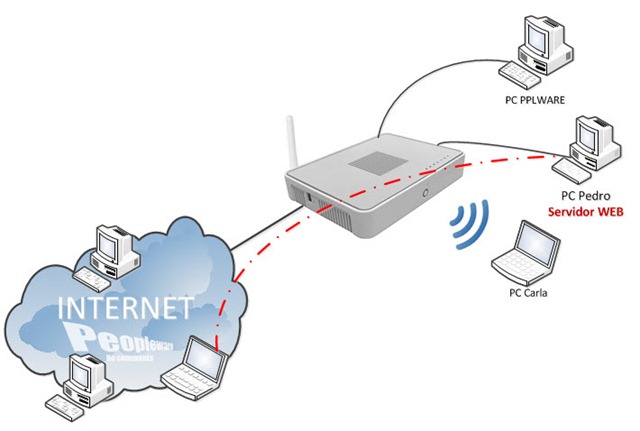
PORT FORWARDING… O QUE É?
Explicando de forma muito simples pensem no seguinte, imaginem que na vossa máquina (ex. PC portátil) têm a correr um servidor Web (Apache, IIS, TomCat, etc) e pretendem que esse serviço esteja disponível a partir de qualquer lugar da Internet. Uma vez que associado ao nosso serviço MEO temos um um IP público disponível , então só temos que redireccionar todos os pedidos que chegam ao vosso router para a porta 80, para a vossa máquina local.
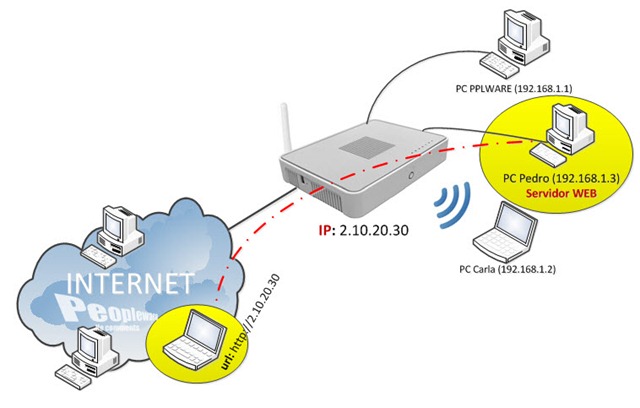
Para a explicação de como configurar Port Forwarding num router da Meo, vamos considerar que o PC Pedro possui um servidor Web (a funcionar na porta 80) e que os utilizadores externos à rede pretendem aceder ao mesmo.
Nesse sentido vamos redireccionar que todos os pedidos que chegam ao router MEO para a porta 80, de forma a serem encaminhados para o PC Pedro que possui um apache a correr.
Para proceder a essa configuração, abrirmos a página de administração do nosso router da MEO através do url: http://192.168.1.254 e usamos as seguintes credenciais:
Utilizador: AdministratorPassword: 3!play
Em seguida vamos ao menu Ferramentas –> Partilha de jogos e aplicações e em seguida escolhemosAtribuir jogo ou aplicação a um dispositivo de rede local
Nota: Nesta página temos a possibilidade de usar um “perfil/serviço” já definido ou então Configurar novo jogo ou aplicação. Para este exemplo vamos considerar a primeira opção. Em seguida no campo Jogo ou Aplicação devem escolher HTTP Server (World Wide Web) e no Dispositivodevem indicar qual o máquina local que tem esse serviço a correr. Para finalizar carreguem em Adicionar.
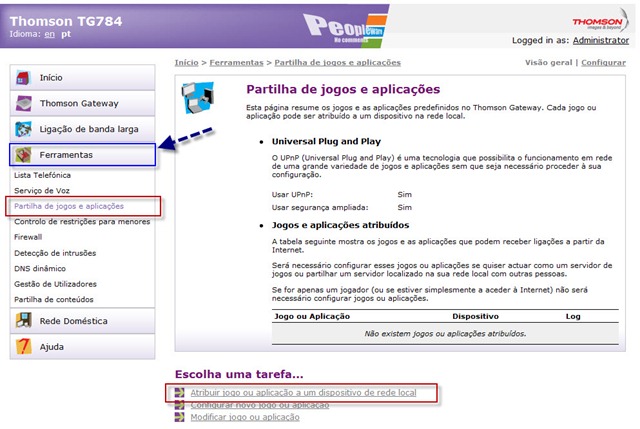 Em seguida no campo Jogo ou Aplicação devem escolher HTTP Server (World Wide Web) e no Dispositivodevem indicar qual o máquina local que tem esse serviço a correr. Para finalizar carreguem em Adicionar.
 Depois de realizada a configuração anterior, deverá aparecer a referência da mesma conforma mostra a figura seguinte:
Feito isto, só têm de saber qual o endereço público (endereço conhecido a partir de qualquer da Internet) associado ao vosso router Meo. Para saberem qual o vosso endereço do exterior podem visitar por exemplo a página: http://www.ip-adress.com/
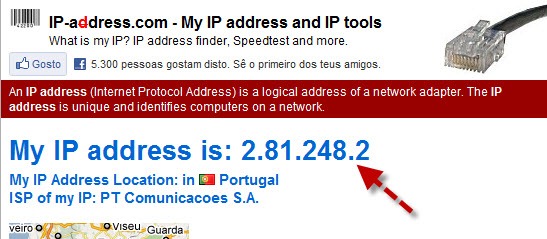
Para testarem basta introduzirem no vosso browser o endereço que foi fornecido pela página anterior e verificar se os pedidos estão a chegar a vossa máquina local ou seja, se conseguem ver por exemplo a página Web que está na máquina 192.168.1.3.
Com este tipo de serviço podem por exemplo fazer Remote Desktop a vossa máquina bastando para isso redireccionar os pedidos à porta 3389, ou VNC, SSH, Telnet, etc etc. Só têm de saber em que porta está a correr um determinado serviço e reencaminhar os pedidos para a máquina/porto que pretendam.
Espero que este tutorial seja útil.
Tuesday, May 03, 2016
What is the 'whoopsie' process and how can I remove it?
How do I disable it on a server or via the command-line?
- Just change the
report_crashesparameter tofalsein the/etc/default/whoopsiefile. - Then bid farewell to whoopsie with
sudo service whoopsie stop.
https://wiki.ubuntu.com/Tracker
Comments and Discussion
How to disable tracker globally :
- Disabling tracker for globally (for all users)
- Edit /etc/xdg/autostart/trackerd.desktop file with root priviledges (sudo vim, gksudo gedit ...)
- Add "Hidden=true" to the end of the file
- Do the same for /etc/xdg/autostart/tracker-applet.desktop if you want
- Disabling tracker for your user only
- Enter the directory "~/.config/autostart", create it if it does not exist
- Create a file named trackerd.desktop
- Paste the following into the file, save and exit
      [Desktop Entry]
      Encoding=UTF-8
      Name=Tracker
      Hidden=true
- Gokdeniz Karadag
Friday, February 19, 2016
non-existent service “fos_user.doctrine_registry”
in your app/config/config.yml, you have to alias fos_user.doctrine_registry to doctrine
services:
fos_user.doctrine_registry:
alias: doctrine
services:
fos_user.doctrine_registry:
alias: doctrine
Saturday, October 31, 2015
Nodejs v5 on ubuntu 14.04
# Using Ubuntu
curl -sL https://deb.nodesource.com/setup_5.x | sudo -E bash -
sudo apt-get install -y nodejs
node -vv5.0.0
for the stable version:sudo npm cache clean -f
sudo npm install -g n
sudo n stable
sudo ln -sf /usr/local/n/versions/node/<VERSION>/bin/node /usr/bin/nodejssudo n latest
To undo:
sudo apt-get install --reinstall nodejs-legacy     # fix /usr/bin/node
sudo n rm 6.0.0     # replace number with version of Node that was installed
sudo npm uninstall -g n
Subscribe to:
Posts (Atom)